Thursday, November 17, 2022
In this post, we have given a small script to convert BINARY data to BASE64 encoded data.
Before seeing the script, lets have a quick background,
Background: We have some binary data that we want to send across a network. Let's assume, we send them as bits and bytes over the network in a raw format.
Possibility 1: Few combinations of Binary data may be considered as control characters by the intermediate hardware components. (modem). This will result Unexpected behaviour.
Possibility 2: Binary data could be corrupted because the underlying protocol might think that you've entered a special character combination (like how FTP translates line endings).
So, to avoid all these, people encode the binary data into characters. Base64 is one of these types of encodings.
Script:
CREATE OR REPLACE FUNCTION convert_blob_to_base64(pic_blob IN BLOB)
RETURN CLOB
IS
  lc_clob CLOB;
  ln_chunk_size PLS_INTEGER := 24000;
BEGIN
  FOR i IN 0..TRUNC((DBMS_LOB.GETLENGTH(pic_blob) - 1 ) / ln_chunk_size)
  LOOP
    lc_clob := lc_clob
              || UTL_RAW.CAST_TO_VARCHAR2
	 	       ( UTL_ENCODE.BASE64_ENCODE
			        ( DBMS_LOB.SUBSTR( pic_blob,
                                       ln_chunk_size,
                                       i * ln_chunk_size + 1
                                     )
                    )
               );
  END LOOP;
  RETURN lc_clob;
END convert_blob_to_base64;
Thursday, November 17, 2022 0
Saturday, October 15, 2022
Query to check whether file exists on server using Oracle PLSQL (DBMS_LOB.FILEEXISTS, UTL_FILE.FGETATTR)
In this post, we have given few approaches to check whether file exists in the directory or not using PLSQL.
Background:
1. Create a Directory in the server and place the test file

2. Create a DBA_DIRECTORY for the same
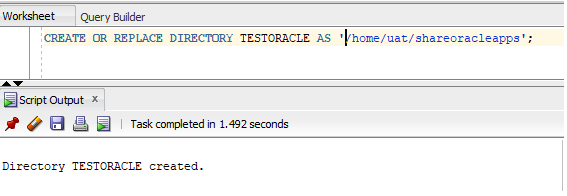
Option 1: Using SQL query and DBMS_LOB.FILEEXISTS and BFILENAME
SELECT (CASE DBMS_LOB.FILEEXISTS(BFILENAME('TESTORACLE','test.dat'))
        WHEN 1 THEN 'FILE_EXISTS'
        ELSE 'FILE NOT FOUND'
        END
        ) testfile,
       (CASE DBMS_LOB.FILEEXISTS(BFILENAME('TESTORACLE','random.dat'))
        WHEN 1 THEN 'FILE_EXISTS'
        ELSE 'FILE NOT FOUND'
        END
        ) randomfile
 FROM  dual;

Option 2: Using PLSQL and UTL_FILE.FGETATTR function
SET SERVEROUTPUT ON;
DECLARE
  ln_length       NUMBER;
  ln_block_size   NUMBER;
  lb_exist BOOLEAN := FALSE;
BEGIN
  UTL_FILE.fgetattr ('TESTORACLE',
                     'random.dat',
                     lb_exist,
                     ln_length,
                     ln_block_size);

  IF lb_exist
  THEN
    DBMS_OUTPUT.put_line ('FILE_EXISTS');
  ELSE
    DBMS_OUTPUT.put_line ('FILE NOT FOUND');
  END IF;
END;

Saturday, October 15, 2022 1
Sunday, September 12, 2021
In this post, we have tried to explain the
performance impact of the miscellaneous function named ANY_VALUE with simple example.
How many times we have come across below
scenario (display department_name) where we are forced to use aggregate function
like MIN or MAX to retrieve a static value within the group. We did this to
simply avoid adding additional columns in group by clause.

Oracle
official documentation:
ANY_VALUE returns a single non-deterministic value of expr. You can use it as an aggregate function.
Use ANY_VALUE to optimize a query that has a GROUP BY clause. ANY_VALUE returns a value of an expression in a group. It is optimized to return the first value.
It ensures that there are no comparisons for any incoming row and also eliminates the necessity to specify every column as part of the GROUP BY clause. Because it does not compare values, ANY_VALUE returns a value more quickly than MIN or MAX in a GROUP BY query.
Analysis:
The interesting part is performance boost which comes with ANY_VALUE comparing to traditional way of MIN or MAX to display a department name like above. Here is the simple script which helps to test the same.
DECLARE

 TYPE ltest IS TABLE OF VARCHAR2(200) INDEX BY PLS_INTEGER;
 ltab_test ltest;
 lt1 timestamp;
 lt2 timestamp;

BEGIN

  dbms_output.put_line('Print Department name using MIN');
  lt1 := SYSTIMESTAMP;
  dbms_output.put_line('Start Time:'||lt1);

  FOR i IN 1 .. 100
  LOOP
    SELECT d.deptno ||'('||MIN(dname)||')'
        BULK COLLECT INTO ltab_test
        FROM scott.emp e,
             scott.dept d
    WHERE e.deptno = d.deptno
    GROUP BY d.deptno;
  END LOOP;

  lt2 := SYSTIMESTAMP;
  dbms_output.put_line('End Time:'||lt2);
  dbms_output.put_line('Elapsed Seconds: '||TO_CHAR(lt2-lt1, 'SSSS.FF'));

  dbms_output.put_line('Print Department name using ANY_VALUE');
  lt1 := SYSTIMESTAMP;
  dbms_output.put_line('Start Time:'||lt1);

  FOR i IN 1 .. 100
  LOOP
    SELECT d.deptno ||'('||any_value(dname)||')'
        BULK COLLECT INTO ltab_test
        FROM scott.emp e,
             scott.dept d
    WHERE e.deptno = d.deptno
    GROUP BY d.deptno;
  END LOOP;

  lt2 := SYSTIMESTAMP;
  dbms_output.put_line('End Time:'||lt2);
  dbms_output.put_line('Elapsed Seconds: '||TO_CHAR(lt2-lt1, 'SSSS.FF'));

END;

Conclusion:
As I shown in above example script, when I used
for lower volume data like SCOTT schema, ANY_VALUE didn’t gave the performance
boost. In fact, it’s slower than MIN or MAX approach. However, with volume of
data against which we perform GROUP BY increases the time taken for MIN/MAX is
increased whereas time taken by ANY_VALUE is moreover same.
Hence, as per my analysis, ANY_VALUE is
pretty much useful from readability perspective. However, performance
improvement comes only when data volume is a high.
Hope it’s useful!!.
Any difference in thoughts, I welcome you put in comments. Its mutual learning J
Sunday, September 12, 2021 1
Saturday, May 22, 2021
Custom Wrapper Function:
CREATE OR REPLACE FUNCTION encode_decode_url (p_url IN VARCHAR2,
                                              p_action IN VARCHAR2
											 )
RETURN VARCHAR2
AS
BEGIN
 IF p_url IS NULL
 THEN
   RETURN NULL;
 END IF;

 IF p_action = 'ENCODE'
 THEN
   RETURN utl_url.escape(p_url, TRUE);
 ELSIF p_action = 'DECODE'
 THEN
   RETURN utl_url.unescape(REPLACE(p_url, '+', ' '));
 ELSE
   RETURN 'Error: Invslid Action';
 END IF;
END encode_decode_url;
Sample Run:

Saturday, May 22, 2021 0
Tuesday, December 8, 2020
Query to get system property (OS name, OS Architecture, OS Version, Oracle Home) and values of environment variables of database server in PLSQL - java.lang.System.getProperty & java.lang.System.getenv
In this post, we have given a PLSQL functions which inturn uses the standard Java function to gather the database tier OS level parameters and environment variable details.
Custom Functions:
CREATE OR REPLACE FUNCTION get_system_property(prop IN VARCHAR2) RETURN VARCHAR2
AUTHID DEFINER IS
LANGUAGE JAVA
name 'java.lang.System.getProperty(java.lang.String) return java.lang.String';
CREATE OR REPLACE FUNCTION get_env_var_path(prop IN VARCHAR2) RETURN VARCHAR2
AUTHID DEFINER IS
LANGUAGE JAVA
name 'java.lang.System.getenv(java.lang.String) return java.lang.String';
Query:
SELECT get_system_property('user.dir') AS oracle_home,
       get_system_property('os.name') AS os_name,
       get_system_property('os.arch') AS os_architecture,
       get_system_property('os.version') AS os_version,
       get_system_property('user.name') AS user_name,
       get_system_property('user.home') AS user_home_directory,
       get_system_property('user.dir') AS user_curr_dir,
       get_system_property('java.vm.version') AS jvm_version,
       get_system_property('java.home') AS JAVA_HOME
FROM dual;
SELECT get_env_var_path('ORACLE_HOME') AS "$ORACLE_HOME", get_env_var_path('CONTEXT_FILE') AS "$CONTEXT_FILE", get_env_var_path('HOSTNAME') AS "$HOSTNAME" FROM dual;System Properties (Quick Reference):
- java.version (Java Runtime Environment version)
- java.vendor (Java Runtime Environment vendor)
- java.vendor.url (Java vendor URL)
- java.home (Java installation directory)
- java.vm.specification.version (Java Virtual Machine specification version)
- java.vm.specification.vendor (Java Virtual Machine specification vendor)
- java.vm.specification.name (Java Virtual Machine specification name)
- java.vm.version (Java Virtual Machine implementation version)
- java.vm.vendor (Java Virtual Machine implementation vendor)
- java.vm.name (Java Virtual Machine implementation name)
- java.specification.version (Java Runtime Environment specification version)
- java.specification.vendor (Java Runtime Environment specification vendor)
- java.specification.name (Java Runtime Environment specification name)
- java.class.version (Java class format version number)
- java.class.path (Java class path)
- java.library.path (List of paths to search when loading libraries)
- java.io.tmpdir (Default temp file path)
- java.compiler (Name of JIT compiler to use)
- os.name (Operating system name)
- os.arch (Operating system architecture)
- os.version (Operating system version)
- file.separator (File separator ("/" on UNIX))
- path.separator (Path separator (":" on UNIX))
- line.separator (Line separator ("\n" on UNIX))
- user.name (User's account name)
- user.home (User's home directory)
- user.dir (User's current working directory)
Tuesday, December 8, 2020 0
Friday, November 20, 2020
Copy Files from one directory to another directory in PLSQL ( UTL_FILE.FCOPY, DBMS_LOB.FILEEXISTS example )
In this post, we have given a custom function which uses UTL_FILE.FCOPY to copy files from one directory to another directory. Further, custom function has below additional validations to check
- Source DBA directory is valid or invalid
- Destination DBA directory is valid or invalid
- source directory exists in server
- destination directory
exists in server
- source file exists or not.
- Override of destination file is allowed based on user parameters
This function can be further expanded with other validations and utilized for file copy operations. Hope this is useful :)
Standard Utility Used: UTL_FILE.FCOPY and DBMS_LOB.FILEEXISTS
Custom Copy Function:
CREATE OR REPLACE FUNCTION FILECOPY (p_source_directory IN VARCHAR2, p_source_filename IN VARCHAR2, p_dest_directory IN VARCHAR2, p_dest_filename IN VARCHAR2, p_override_allowed IN VARCHAR2 DEFAULT 'N' ) RETURN VARCHAR2 AS lb_file_exists BOOLEAN; ln_dummy NUMBER; ln_file_size NUMBER; ln_block_size NUMBER; BEGIN --Check whether source directory exists BEGIN ln_dummy:= 0; SELECT 1 INTO ln_dummy FROM all_directories WHERE directory_name = p_source_directory; EXCEPTION WHEN NO_DATA_FOUND THEN RETURN 'Source DBA Directory Does not exists'; END; -- Check whether the directory present in server IF DBMS_LOB.FILEEXISTS(BFILENAME(p_source_directory,'.')) <> 1 THEN RETURN 'Source Directory Does not exists'; END IF; --Check whether destination directory exists BEGIN ln_dummy:= 0; SELECT 1 INTO ln_dummy FROM all_directories WHERE directory_name = p_dest_directory; EXCEPTION WHEN NO_DATA_FOUND THEN RETURN 'Destination DBA Directory Does not exists'; END; -- Check whether the directory present in server IF DBMS_LOB.FILEEXISTS(BFILENAME(p_dest_directory,'.')) <> 1 THEN RETURN 'Destination Directory Does not exists'; END IF; --Check whether source file exists IF DBMS_LOB.FILEEXISTS(BFILENAME(p_source_directory,p_source_filename)) <> 1 THEN RETURN 'Source File Does not exists'; END IF; --Check whether source file exists IF DBMS_LOB.FILEEXISTS(BFILENAME(p_dest_directory,p_dest_filename)) = 1 AND p_override_allowed = 'N' THEN RETURN 'Destination File Override is not allowed. But, destination file exists'; END IF; BEGIN UTL_FILE.FCOPY (p_source_directory, p_source_filename, p_dest_directory, p_dest_filename ); --Check whether destination file created IF DBMS_LOB.FILEEXISTS(BFILENAME(p_dest_directory,p_dest_filename)) = 1 THEN RETURN 'File Copied Successfully'; ELSE RETURN 'File Copy Failed. Please contact technical team'; END IF; EXCEPTION WHEN UTL_FILE.WRITE_ERROR THEN RETURN 'Destination Write/File Access denied'; WHEN UTL_FILE.READ_ERROR THEN RETURN 'Source Directory/File Access denied'; WHEN UTL_FILE.INVALID_OPERATION THEN -- This is true because we already checked other possible errors like -- source dir, destination dir , source file and dest file exists -- since above errs was not found, its assumed that access issue RETURN 'Directory/File Access denied'; WHEN OTHERS THEN RETURN SQLERRM; END; END FILECOPY;Sample Call to copy Function:SET SERVEROUTPUT ON; DECLARE lv_file_copy_sts VARCHAR2(2000); BEGIN lv_file_copy_sts := FILECOPY(p_source_directory => 'TEST1', p_source_filename => 'testfile.txt', p_dest_directory => 'TEST2', p_dest_filename => 'test.txt', p_override_allowed => 'Y' ); DBMS_OUTPUT.PUT_LINE('File copy Status: '||lv_file_copy_sts); END;
Sample runs to copy Function:


Friday, November 20, 2020 0
